Wednesday, March 29, 2006

Briefcase Vs. Offline Files And Folders

The briefcase, originally designed for mobile laptop users, was designed to provide a user with network data while offline, with the ability to update briefcase contents on demand. The briefcase can be configured to hold both local and network data, but it must be manually updated before and after offline usage has occurred.

Offline Files and Folders are an automated equivalent to the Briefcase application. The idea is to basically store data in an alternate location in the event that the primary source of data becomes unavailable. The difference between the two lies in the fact that the Briefcase cannot automatically update itself, and Offline Files and Folders are restricted to network data.


With Windows 2000, Offline Files and Folders are exclusively configured at the client desktop. With Windows XP and Server 2003, a new feature has been added that allows centralized configuration at the server. This is done from the Sharing tab for the folder properties. By default, the offline configuration is set to enable users to administer Offline Files and Folders as needed. This can be changed to allow administrators to force Offline usage for the active share, or disable both server and client configuration of the feature.

Although there is a new offline data encryption feature for Offline Files and Folders (configured from the client interface), and the added ability to schedule synchronization either upon user logon or logoff, the same feature 'issues' exist with Offline Files and Folders as with Windows 2000, when the feature was first introduced.

Wednesday, March 22, 2006

Firefox 2 Alpha Released!

Firefox 2 Alpha is now available. This is a developer build and is the first of many developer milestones on the path to Firefox 2.

Download Link: FTP Site
Source: Asa Dotzler - Firefox and more: releases (this time it's for real)

How to Uninstall IE7 Beta 2 when uninstall files are deleted

IE7 Beta 2 Refresh is out. Before install, simply uninstall the previous IE7 Beta if you had it installed. Go to Control Panel- Programs- Updates and select Internet Explorer Beta 2 to uninstall. But what if, like me, you're the type of person who likes to mod your system files and delete uninstall files (considered junk by people like me). The problem is, deleting the IE7 beta setup files from the Windows folder will disable the ability to uninstall it automatically. You wouldn't see it in Add/Remove Programs. Dont worry, there are still some ways to uninstall IE7 and ultimately allow you install the IE7 Beta Refresh.

If you have this problem, you probably are an advance Windows user since youre touching on Windows files that you shouldn't have. But if for some reason you're a novice Windows user with exact same problem (no way to uninstall), you probably want to just stick it out with a software called XPLite. Select Internet Explorer on the items to uninstall, and then reboot.

Another way to do it is somewhat manual and complex and would require that you're comfortable editing the registry and familiar with system files. First, you will need another PC with IE7 Beta installed and the uninstall files available. If you cant find one, you're out of luck. The setup files are normally in this folder:

c:\windows\$NtUninstallie7b2pmx$

Copy this folder to the exact same location. Next do the following registry editing:

Go to the key: HKEY_CURRENT_USER\Software\Microsoft\Internet Explorer

Right click on Internet Explorer New String Value. Name that value:

InstalledByUser (the value of the new String should be your User Account name)

Then run the following:

c:\windows\$NtUninstallie7bet2p$\spuninst\spuninst.exe

This will uninstall Internet Explorer 7 Beta 2 on your PC. Hope this solve your problem.


Tuesday, March 21, 2006

Filipino-made Free and Open Source Software Index

As a service to the Philippine computing society, listed here are free
and open source software that are authored, developed and/or maintained
by Filipinos.

Link:
Filipino-made Free and Open Source Software Index — Philippine Linux Users' Group

Monday, March 20, 2006

FreeMind - an open-mind mapping software


Mind Mapping Software - if you dont know, is a tool to create mind maps. A mind map (or mind-map) is a diagram used for linking words and ideas to a central key word or idea. It is used to visualize, classify, structure, and generate ideas, as well as an aid in study, problem solving, and decision making. (Link: Wikipedia-MindMap)

Bill Gates has written a column titled: “The Road Ahead: How ‘intelligent agents’ and mind-mappers are taking our information democracy to the next stage.” (Link: MSNBC)

Gates notes that “…advanced software and Web services can help us trace, slice and dice this information [available to PC users] in ways that were impossible only a decade ago. But while we’ve gone a long way towards optimizing how we use information, we haven’t yet done the same for knowledge…On another level, OneNote and a new generation of ‘mind-mapping’ software can also be used as a digital ‘blank slate’ to help connect and synthesize ideas and data—and ultimately create new knowledge.”

FreeMind is a premier free mind-mapping software written in Java. So what can it do? Well what do you want? The developers of freemind has invitingly asked you:

"So you want to write a completely new metaphysics? Why don't you use FreeMind? You have a tool at hand that remarkably resembles the tray slips of Robert Pirsig, described in his sequel to Zen and the Art of Motorcycle Maintenance called Lila. Do you want to refactor your essays in a similar way you would refactor software? Or do you want to keep personal knowledge base, which is easy to manage? Why don't you try FreeMind? Do you want to prioritize, know where you are, where you've been and where you are heading, as Stephen Covey would advise you? Have you tried FreeMind to keep track of all the things that are needed for that?"


Link:
FreeMind - free mind mapping software


Friday, March 17, 2006

Photos of Bill Gates House

Anybody wants a glimpse of the house of the world’s richest man.

Bill Gates Mansion satellite view from Google Maps
Bill Gates House Aerial view from MSN Virtual Earth

Bill Gates House Photo Slideshow

Now who say money can’t buy you everything…

ClearType to crank up your LCD readability

There was some discussion recently on Microsoft's decision to turn ClearType on by default in IE7's rendering of web pages. Well anyway, the thing here is most people doesn't really know what ClearType is. Im not patronizing Microsoft here, but the fact is, if you're an LCD user (such as laptops), you probably would want to turn on ClearType. here is a comparisson of how your font readability will increase by turning on ClearType:

Free Image Hosting at www.ImageShack.us

To turn ON ClearType:

1. Click Start, click Control Panel, and then click Appearance and Themes.
2. Click the Display icon, click the Appearance tab, and then click Effects.
3. Click the Use the following method to smooth edges of screen fonts check box to select it, and select ClearType from the list.
4. Click OK, and then click OK again.

There is an online tuner by Microsoft that allows you to turn on and tune your ClearType settings. Alternately, you could download a Windows XP Powertoy Version of the tuner.

Thursday, March 16, 2006

Internet Lingo and Emoticons

There has been much debate as to the lack of web standard for Internet Lingo and emoticons. Hopefully this helps:

Everyday Acronyms: Coming and Going

afk Away from keyboardAnd about to do goodness knows what.
bak
Back at keyboard Having done goodness knows what.
bfn Bye for nowTells others you're stepping away for an indeterminate amount of time.
Variations: b4n, bbl (be back later).
brb
Be right backAnnounces a brief absence, as if you're pausing to read a Shakespeare sonnet.
cu
See you. The more formal version of cya (See ya).
ltns Long time, no see. A polite way of saying "I forgot you even existed," which could be abbreviated as ifuee.
ttfn
Ta ta for nowWhat Zsa Zsa Gabor might say when exiting a chat room.
Variation: l8tr (later).

Flaming and Feuding
gal Get a lifeThe exact opposite of
hand
(have a nice day).
kiss
Keep it simple, stupid. An impolite way of saying
ot
(off topic)
.pu That stinks
tswc
Tell someone who cares

Hooting and Hollering
gfete Grinning from ear to earIndicates mild amusement in which minimal dental work is displayed.
lmao Laughing my ankles offThe third word can also refer to another body part.
lol Laughing out loudAn appropriate response to a humorous statement. Alas, it doesn't necessarily mean lots of love.
rotfl
Rolling on the floor laughingUse when you couldn't possibly be more amused. Unless you're rotflmao, of course.

Opining and Informing
aamof As a matter of factThough in cyberspace, the fact could just as well be fiction.afaik As far as I knowUse when you really don't know, but want to appear as if you do. Variations: afaic (as far as I'm concerned), afaict (as far as I can tell). btw By the wayA kissin' cousin to fyi (for your information) and fwiw (for what it's worth). damhikt Don't ask me how I know thisFor those obscure factoids your friends tease you for remembering.eod End of discussionUse EOD after the 163,456th chat-room message about the new Star Wars trailer.hth Hope this (or that) helpsimho In my humble (or honest) opinionCommonly used to preface unsolicited advice, such as "If I were you, I would dump your no-account girlfriend immediately."Variations: imnsho (in my not so humble opinion), imco (in my considered opinion). ianalb I am not a lawyer, but... As in, "IANALB I play one on TV."j/k Just kiddingBest used when combined with the :) emoticon. For more on the world of emoticons, see below…ot Off topicA polite way of saying kiss (keep it simple, stupid).otoh On the other handIndicates you were once a member of the high school debate team.
aiamu And I'm a monkey's uncleSimian slurs are popular everywhere, and cyberspace is no exception. bbfbbm Body by Fisher, brains by MattelPut another way: You have the physique of a Tonka truck and the intellect of Barbie.
cmf Count my fingersSimilar to, though different from, rml (read my lips) or tmt (tally my toes).dgt Don't go thereBest emphasized by raising your eyebrows, placing one hand on a hip and with the other hand, wagging your index finger warningly--though, of course, your readers will have to imagine that part.dqydj Don't quit your day jobOr as they say on The Sopranos, 'fagiddaboudit.' tmi Too much informationAn appropriate response to someone who claims their dog likes to eat the furballs their cat coughs up.

Everyday Emoticons
:) Smile:( Frown
;) Wink
:o Shocked
?-(
Black eye
(((Insert name here)))
A cyberhug for the person whose name is surrounded by parentheses
:P Disgusted The P indicates a protruding tongue.
5:)
Elvis
@>--;--
A rose

Favorite Exotic Emoticons
:-E Bucktoothed vampire
:-F
Bucktoothed vampire with one tooth missing
:-.)
Cindy Crawford
*<) :o) Clown
O-)
Cyclops
:-! Foot in mouth
@:-}
Just back from the hairdresser
{:-
Wears a toupee
@@@@:-)
Marge Simpson
:8)
Pig
:-8 Talking out of both sides of your mouth

Head to head: XP vs. Vista

Do you need a good point by point feature comparisson between your Windows XP and the eagerly anticipated but much delayed Windows Vista?  Andy presents a very informative description of the two OS: Source:BentUser - Windows XP and Vista b5270 Side-by-Side

File Hippo

Have you ever had a problem of keeping track of your free and open-source softwares for updates and new versions? Filehippo.com does a very nice job of collecting all of this free stuffs and dumps it into one neat-looking webpage. A nice feature is that it allows you not only to download the latest release but previous old versions as well, very handy when you discover that the latest release gives you more trouble than expected.

Link:
File Hippo - Free Software Downloads

Wednesday, March 15, 2006

Google Desktop takes 'ctrl' of your desktop

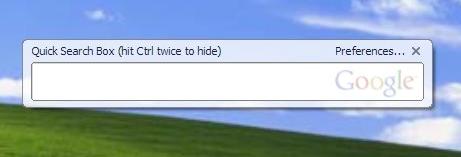
The new version of Google Desktop 3 fixed a number of things from the previous beta, and also has a new neat feature called Quick Search Box. Pressing 'ctrl' twice anywhere launches the neat looking search box. This actually allowed me remove some clutters off my taskbar by getting rid of the google deskbar. (I dont need it with this).


Other new features of GDS 3.0:

  • Under: search operator
  • Zip Search
  • Lock Search
  • Spell checker! (yes- spellproof your querries)
Links:
Google Desktop 3 website
Source:
Inside Google Desktop: Take 'ctrl' of your Desktop

Tuesday, March 14, 2006

Microsoft Management Console 3.0

Microsoft Management Console 3.0 (MMC 3.0) is a framework that unifies and simplifies day-to-day system management tasks on Windows by providing common navigation, menus, toolbars, and workflow across diverse tools. A version for Windows Server 2003 is also available.

Download Link

Performancing for Firefox 1.1.1

Performancing for Firefox is a full featured blog editor that sits right within Firefox. Just hit F8
or click the little pencil icon at the bottom right to bring up the
blog editor and easily post to your Wordpress, MovableType or Blogger
blogs.

Performancing for Firefox 1.1.1 | Performancing Site

Monday, March 13, 2006

Flyakite OSX 3.5

Ok you guys who feel so envious of how sleek the apple OS is but cannot afford to switch gears, go out and download this nice installer from Chris Kite. It will akin your Windows into something you'll not be able to take your eyes off.

Extend Firefox Winners Announced

The winners for the extend firefox contest has been announced, and whooah, this extensions are great! That's an understatement dude. I especially like Reveal and DownThemAll. Reveal is a super-fast tab visualizer and switcher. It has a very sleek and smooth approach to displaying the current tabs on the screen, something totally creative. DownThemAll is a fully functional download manager, since its an extension, it's fully integrated within firefox. Now we'll be able to resume download even when we exit firefox or it crashes unexpectedly.

For more of the winners, find it here:
Extend Firefox Contest Winners :: Mozilla Update